Thursday, 28 November 2013

Editing progression- light issue
A problem which I have found is some shots whilst editing in Vegas are really dark, and I cant really alter the light filtering in Vegas, however on Windows Live Movie Maker I can adjust the brightness and light filtering which makes it a ting bit lighter, whilst maintaining
a pure image not a grainy shot.Below is a screen shot of the brightness tool on Windows Live Movie Maker, once I have made the shot lighter I than can upload it onto Vegas and it wont be too dark.

Below is a shot of the dark version on Windows Live Movie Maker before i have adjusted the brightness, the next step is the following image where i have increased the brightness only slightly.

This is the picture once the brightness has been increased, you can see a major difference between the two, because our location was very dark most of the footage is dark so i have had to adjust the brightness on many frames.

Tuesday, 26 November 2013


Saturday, 23 November 2013
Creation of digipack
These are some photos of yesterdays production, we spent 3 hours devoted to starting our digi pack concept on Photoshop and just seeing the possible outcomes. We found it a very productive session especially in terms of getting to grips with Adobe Photoshop.

This first picture is of us getting used to applying our specific yellow from when we drew our ideas down. We wanted to consistent so all four sides of the digi pack template will be that specific yellow.

Here we were just playing around with text types and fonts, and using shadow to add depth which makes it seem less 2D. Changing the conventional square and making it into a diamond shape, was quiet cool, from there you could create a kite and have bunting hanging down. Again, a kite is reminiscent of a children and a toy associated with children .

Here again is just a shot of me paying around with shadows and which way they can go, and changing the colour. This inspiration for the big bold font was from Robin Thicke we thought that his large font is really in the audience face which passes the information efficiently.

This is what we agreed on for our front cover as a working prototype, instead of having it diamond shape we want to stay conventional for the shape on the front cover.

Here is the back cover which has space for the bar-code, our symbol and our track lists, this still needs to be finalised but its a work in progress.

This is a photo of us putting our symbol in which will also be in our video. This is our first time using Photoshop so it took a while for us to work out how to crop it in a circle and put it onto our back cover template.

After 3 hours consecutively this is what we finished with, front cover, back cover and a CD. This perhaps wont be the final idea as we might want to change but it shows our concept develop from start to a working prototype.
Friday, 22 November 2013
Editing progression


Wednesday, 20 November 2013
Creating a logo for our Digi Pack, Magazine Advert and Music Video.
I thought sooner or later we were going to have some sought of logo but didn't know what it would include (obviously the song name and artist). The Rabbit and Horse mask were always seen as a humorous part of our video even evident in the survey we did for our audience. Therefore, it would be a big mistake not to incorporate in the logo. The rabbit mask was particularly iconic as no one has seen anything like it before because its unconventional. I used Photoshop on my laptop to create it and these are a few photos showing the process. I used a graphics tablet to cut the rabbit mask from a original picture i put on my blog when we first got the masks. The logo itself was just paying around learning how to use Photoshop and getting to grips with developing a iconic emblem for our digi pack, magazine advert and music video.
2

3


1
2
3
4
Testing Marshmallow shots
From the very beginning when we did the story boards, our group have al wanted to video a marshmallow burning slowly with different lighting effects. We were surprised at how good it actually turned out, we tried different shots medium/ close and close ups and than we fiddled around with the lighting on the camera and on Vegas. Even though we might not include this into our final video it still looked pretty cool.
Testing animated stick man- further progression.
Thursday, 14 November 2013
Digi Pack concept.
With our digipack we want to create something warm and inviting so it stands out to our audience. We've decided tot take the traditional conventional children's party invite innovation and link it with our magazine and digipack concept. Our genre is house music which has many different digpack ideas, colours and messages, we really want achieve simplicity.

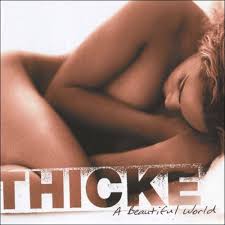
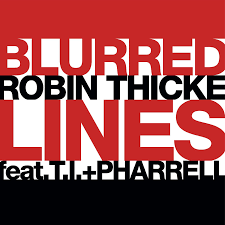


This is a very stereotypical children's party invite, we want to take that image and intertwine it with our concept. Making it stereotypical might mean the audience can relate to it easier, therefore we would need to include the conventional props like balloons, bunting and confetti.
The font which Robin Thicke uses is very distinct, no other artist uses big block capital font. I think its really conventional its right in the audiences face. If we took the same concept it would come across as really power and efficient.

We decided to use the colour yellow as a background colour, because it is warming and inviting for our audience.

This was a quick drawing of a possible idea to cover the front of the digipack.
This video is trying to link our digipack idea of stick figure finger print people with our music video, therefore we tried to animate a finger print stick figure and link it into our video. This is just a test seeing if it works or if it wont be executed properly, but it will take a while to perfect.
Behind the scene shots
Wednesday, 13 November 2013

Monday, 11 November 2013

Friday, 8 November 2013
Planning our Media Video
Our video is very reliant on a cast therefore we needed to make sure well in advance that people are available for the event.

Monday, 4 November 2013
Subscribe to:
Posts (Atom)